Transity Documentation
The plain text accounting tool of the future. Keep track of your 💵, 🕘, 🐖, 🐄, 🍻 on your command line.
Also check out the playground on the landing page!
For help or feature requests, please visit our GitHub Discussions page!
Features
Features
- Easily editable and processable file format based on YAML
- Modeled on transactions instead of debiting / crediting accounts
→ Support for complex transactions made up of several transfers- Dedicated payer (from) and payee (to) fields (ledger only supports payee)
- No misuse of accounts as categories / tags
→ Direct support for tags - Clear separation between
- Physical account (e.g. wallet, bank account)
- Entities (e.g. my mum, a company)
- Purpose of transaction (e.g. food, travel)
- No hard-coded asset / liability connotation as it is viewpoint dependent
→ Choose viewpoint by setting the owner of the journal - Initial balances
- High precision timestamps in ISO 8601 format
- Reference external files (e.g. receipts, contracts, bank statements, …)
- Safety checks
- BigInt fractional numbers to eliminate rounding errors
- Verifies exclusive use of predefined entities
- Checks in transactions match with verification balances
- Checks that referenced external files exist and that all external files are referenced
- Export to other formats for post-processing
- Gnuplot - For trends
- (H)ledger Format - For using (H)ledger exclusive features
- CSV and TSV - For further processing in spreadsheet software
- XLSX aka Excel - For further processing in spreadsheet software
- Multi file support
Installation
Installation
Transity is distributed as a Rust crate and can therefore be installed via crates.io:
cargo install transity
Usage
Usage
Plain text accounting means tracking finances in human-readable text files rather than in a database or proprietary software. Your financial data is stored as a simple YAML journal file that you edit with any text editor and process with command line tools.
This makes your data version-controllable, diffable, scriptable, and fully under your control. No lock-in, no opaque formats, no required GUI.
Journal File Format
A minimal journal file is a YAML file with following format:
owner: anna
config:
  separator: ':'
commodities:
  - id: €
    name: Euro
    alias:
      - EUR
    note: Currency used in the European Union
    utc: '2017-04-02 19:33:53'

entities:
  - id: anna
    name: Anna Smith
    utc: '2017-04-02 19:33:28'
    tags:
      - person
    accounts:
      - id: wallet
        name: Wallet
        note: Anna's black wallet
        utc: '2017-04-02 19:33:28'
        tags:
          - wallet

  - id: evil-corp
    name: Evil Corporation
    utc: '2017-04-02 19:33:28'
    note: The Evil Corporation in the United States of Evil
    tags:
      - company

transactions:
  - title: Purchase of evil machine
    transfers:
      - utc: '2017-02-17'
        from: anna
        to: evil-corp
        amount: 50000 €
      - utc: '2017-02-17'
        from: evil-corp
        to: anna
        amount: 1 evil-machine
Account Separator
Account IDs use a hierarchy separator to distinguish the entity
from the account name (e.g. anna:wallet).
When no separator is configured, both : and / are accepted
and automatically normalized to /.
This means anna/wallet and anna:wallet are equivalent.
You can set a custom separator in the journal file under config:
owner: anna

config:
  separator: "|"

entities:
  - id: anna
    accounts:
      - id: wallet

transactions:
  - transfers:
      - utc: '2024-01-15'
        from: anna|wallet
        to: shop|cash
        amount: 42 €
When a separator is explicitly configured, only that character is
treated as a hierarchy separator.
Other characters (like : when the separator is /)
are treated as literal parts of the account name.
The separator must be exactly one character.
Commodity Prices
To value holdings like shares or foreign currencies over time
(e.g. in the “Value in …” chart of the web app),
declare their market prices under prices:
prices:
  - utc: '2024-01-15'
    commodity: AAPL
    price: 185.50 USD
  - utc: '2024-01-15'
    commodity: USD
    price: 0.92 €
Each entry states the price of one unit of commodity at utc.
A value is converted with the latest price on or before its date.
Inverse prices are derived automatically
and prices can be chained (here AAPL → USD → €).
Exchange transactions (like buying shares) also imply a price. Declared prices take precedence over implied ones on the same day.
For assets whose value changes gradually, like real estate,
set price-interpolation: linear on the commodity.
The price then changes linearly between two prices
instead of jumping on the date of the next one:
commodities:
  - id: FLAT
    name: Flat in Berlin
    price-interpolation: linear  # Default: step

prices:
  - utc: '2024-06-30'
    commodity: FLAT
    price: 400000 €
  - utc: '2025-06-30'
    commodity: FLAT
    price: 420000 €  # → Valued at ~410000 € on 2024-12-30
Prices can also live in a separate file that only contains prices
and be passed as an additional journal file.
Inflation
To show the “Value in …” chart of the web app adjusted for inflation,
declare a price index (e.g. the consumer price index)
for the main currency under price-indices:
price-indices:
  - utc: '2024-01-01'
    commodity: €
    value: 117.6
  - utc: '2024-02-01'
    commodity: €
    value: 118.1
The index is interpolated linearly between two values. Adjusted values are expressed in the purchasing power of the last day of the chart (or of the last index value, if that is earlier). Values before the first index value are not shown. Only the ratio between index values matters, so any base year can be used. Like prices, price indices can live in a separate file.
Analyzing Journal Files
Balance
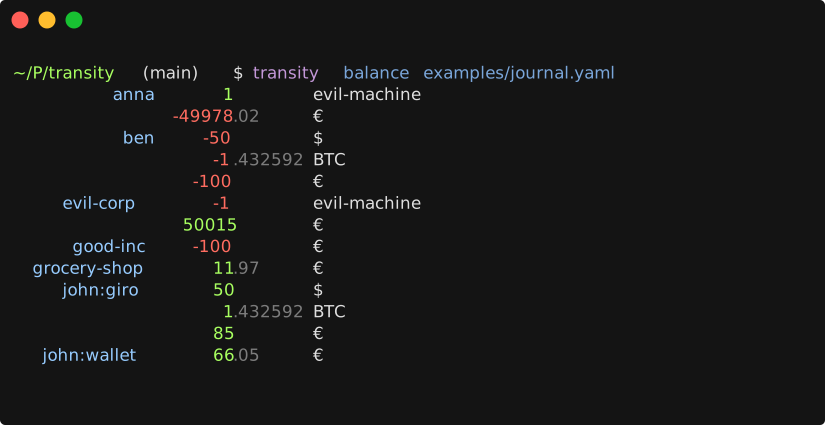
$ transity balance examples/journal.yaml
          anna       1        evil-machine
                -49978.02     €
           ben     -50        $
                    -1.432592 BTC
                  -100        €
     evil-corp      -1        evil-machine
                 50015        €
      good-inc    -100        €
  grocery-shop      11.97     €
  john             371.04     €
                    50        $
                     1.432592 BTC
      :default     219.99     €
          giro      50        $
                     1.432592 BTC
                    85        €
        wallet      66.05     €
If linked modules aren’t exposed in your path you can also run
cli/main.js balance examples/journal.yaml
Help
List complete usage manual by simply calling transity without any arguments.
$ transity

Usage: transity <command> <path/to/journal.yaml>

Command             Description
------------------  ------------------------------------------------------------
balance             Simple balance of all accounts
transactions        All transactions and their transfers
transfers           All transfers with one transfer per line
entries             All individual deposits & withdrawals
entries-by-account  All individual deposits & withdrawals grouped by account
gplot               Code and data for gnuplot impulse diagram
                    to visualize transfers of all accounts
gplot-cumul         Code and data for cumuluative gnuplot step chart
                    to visualize balance of all accounts
Filtering
Most commands support --begin, --end, --owner, and --tag flags
to narrow down results.
Date range with --begin (inclusive) and --end (exclusive):
transity balance examples/journal.yaml --begin 2024-01-01 --end 2025-01-01
Owner override with --owner:
transity balance examples/journal.yaml --owner anna
Tag filter with --tag:
The --tag flag accepts a boolean expression over entity tags.
A transfer is included if at least one of its entities
(the from or to side) satisfies the expression.
# Simple: include transfers involving entities tagged "person"
transity balance examples/journal.yaml --tag person

# OR: include transfers involving "person" or "company" entities
transity balance examples/journal.yaml --tag 'person or company'

# AND: only entities that have both tags
transity balance examples/journal.yaml --tag 'person and owner'

# NOT: exclude entities tagged "company"
transity balance examples/journal.yaml --tag 'not company'

# Parentheses for grouping
transity balance examples/journal.yaml --tag '(person or company) and not owner'
Operator precedence from highest to lowest: not, and, or.
Filters can be combined:
transity transfers examples/journal.yaml \
  --begin 2024-01-01 \
  --tag 'person and not company'
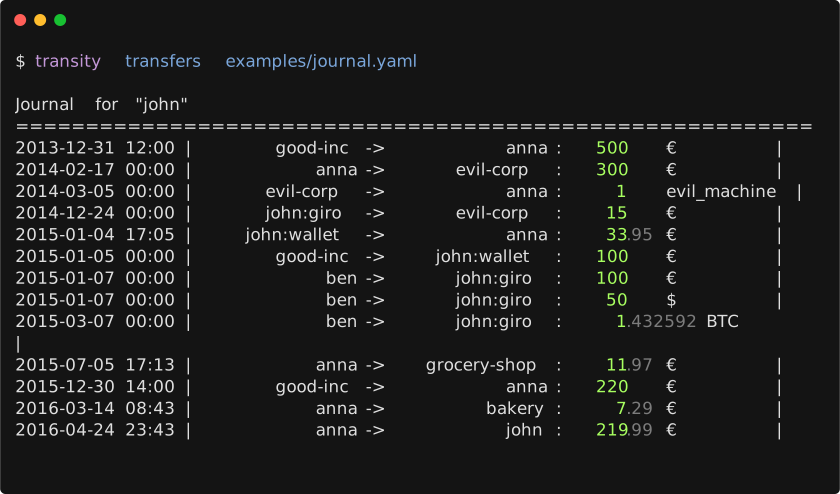
Transfers
Plotting
By default all accounts are plotted.
To limit it to only a subsection use awk to filter the output.
For example all transactions of Euro accounts:
transity gplot examples/journal.yaml \
| awk '/^$/ || /(EOD|^set terminal)/ || /€/' \
| gnuplot \
| imgcat
Or all account balances of Euro accounts over time:
transity gplot-cumul examples/journal.yaml \
| awk '/^$/ || /(EOD|^set terminal)/ || /€/' \
| gnuplot \
| imgcat
Scripts
Useful scripts leveraging other command line tools.
Check Order of Entries
Check if all entries are in a chronological order
ag --nonumbers "^ utc:" journals/main.yaml | tr -d "\'" | sort -c
Tutorials
- cs007.blog - Personal finance for engineers.
- principlesofaccounting.com - Online tutorial on accounting.
Import
Import
With LLMs
LLMs are surprisingly good at converting any financial data (e.g. CSVs, bank statements, chat history, images, photos, …) to a Transity journal file. Just provide them with an example journal file and prompt them to convert it to this format.
From Ledger CLI
Execute the included ledger2transity script:
./ledger2transity.sh examples/hledger.journal > transactions.csv
Convert transactions.csv to YAML with e.g. browserling.com/tools/csv-to-yaml
Attention:
- Merge adjacent entries as each entry only debits / credits an account.
A transaction always involves 2 accounts (
fromandto). (For expenses basically copy the ledger-account from the second entry into thefromfield of the first entry) fromandtomight be reversed for income (depending on how thepayeefield was used)- Account names of Ledger-CLI are interpreted as tags Transity understands accounts as physical accounts
- The note is duplicated in the
tagsfield. There is no way to get only the tags in Ledger-CLI 😔
Scripts
Transity includes a few scripts located at ./scripts to automate a Chrome browser to download data.
Retrieving Data from Banks
It supports downloading CSV files of all transactions and converting them to journal files and retrieving the current account balance:
node scripts/transactions/hypovereinsbank.js > transactions.yaml
This will prompt you for your credentials and afterwards automate a headless Chrome instance to download and convert the data.
Currently supported accounts for transactions:
- DKB Visa Card
- DKB Giro Account
- HypoVereinsbank
- MBS
- PayPal
- Trade Republic (cash and securities account, incl. trades, dividends, and interest)
Currently supported accounts for balances:
Contributions are very welcome!
FAQ
FAQ
Why another plain text accounting tool?
Existing accounting tools are historically based on the notion of an account. You add money (debit) and you remove money (credit). (If this sounds backwards to you, read this explanation)
For example you get 50 € from your mum and buy some food for 20 €.
Account | Debit | Credit
--------|-------|--------
Wallet  |  50 € |
Wallet  |       |   20 €
Simple, but also incomplete. Where did the money come from, where did it go? This led to double entry bookkeeping. Whenever you add some money to an account, you have to remove the same amount from another.
Account | Debit | Credit
--------|-------|--------
Wallet  |  50 € |
Mum     |       |   50 €
Wallet  |       |   20 €
Food    |  20 € |
But you must never forget a posting, because otherwise your account won’t balance.
Account | Debit | Credit
--------|-------|--------
Wallet  |  50 € |
Mum     |       |   50 €
Wallet  |       |   20 €
Oops, where did the money go? 🤷
If this looks (and sounds) confusing or too complicated, you’re not alone! It made sense in former times as this layout makes it easier to add up the amounts by hand, but not in times of computers.
So how can we simplify it? It’s actually quite easy: We just have to model it in terms of transactions, and not accounts.
From   | To     | Amount
-------|--------|--------
Mum    | Wallet |   50 €
Wallet | Food   |   20 €
- Simple - No more confusing debit / credit / asset / liability mumbo jumbo
- Intuitive - Just like you would talk about it
- Safe - It’s obvious if you forget to fill out a field
Together with some further changes it yields an easier to understand, more robust and more complete representation of accounting!
Related
Related
For a full list of PTA (plain text accounting) tools check out plaintextaccounting.org.
Here are some of the links that are especially relevant for Transity:
Other Plain Text Accounting Tools
- Beancount - Double-entry accounting from text files (Python).
- Centjes - Plaintext double-entry accounting.
- Hledger - Ledger clone with a focus on UX, reliability, and real-world practicality (Haskell).
- Ledger - The original command line accounting tool (C++).
- Ledgera - Desktop app for managing hledger journals (Tauri, React, Rust).
- Rust Ledger - Ledger clone that uses YAML as well (Rust).
- Tackler - Fast & reliable PTA engine with native GIT SCM support (Rust).
Other Finance Management Apps
- Actual - Local-first personal finance system.
- Bagels - TUI expense tracker.
- Cashtrackr - Manage and visualize finances.
- Copilot - Track spending, budgets, investments, and net worth.
- DrCr - Self-contained open-source double-entry bookkeeping framework.
- Empower - Budget planner.
- Fidelity - Financial planning, wealth management, trading, and brokerage.
- FinBodh - Personal finance app to track, understand, and plan your finances.
- FiTui - Terminal based expense tracker written in Rust
- HandsOnMoney - Simple, private double-entry home finance for iPhone with GnuCash sync.
- Helius - Local-first CLI/TUI finance tracker with SQLite storage (Rust).
- Kakeibo - Privacy-focused budgeting app using the Japanese Kakeibo method (iOS, Android).
- Monarch - Track your account balances, transactions, and investments.
- Ray - AI financial advisor CLI with encrypted local storage and Plaid bank sync (TypeScript).
- Roi - All-in-one investing platform to track & trade existing accounts.
- Track Your Dividends - Track your dividend portfolio and its performance.
- Wealthfolio - Open source investment tracker.
- Write It Down - Spreadsheet powered personal finance tracker.
- YNAB - Budgeting software for personal finance.
Tools
- Column - Nationally chartered bank to enable developers to create new financial products.
- Ibanity - APIs that allow you to use financial services.
- Numscript - DSL to express financial transaction.
- Spreadsheet Formulas for Personal Finance
Comparison
Comparison
Ledger and Hledger’s transactions are a (balanced) group of account postings. Transity’s transactions are a group of transfers between two accounts.
Syntax
Checkout the files hledger.journal and journal.yaml for similar transactions modeled in Hledger and in Transity.
There is a lot of ambiguity in the ledger journal format. Are you able to tell the difference between the 2 options?
2019-01-17 Bought food
  expenses:food  $10
  assets:cash
vs
2019-01-17 Bought food
  assets:cash
  expenses:food  $10
Also, it lacks some fields for more precise recording of which parties where involved.
- What food?
- Where did you buy it?
- When exactly did you buy it?
- Which supermarket?
2019-01-17 Bought food
  expenses:food  $10
  assets:cash
Example
A Transity entry as a transaction made of up four transfers:
utc: '2024-04-16 18:50:28'
tags: [domain]
note: 1 year registration of domain "ad-si.com"
transfers:
  - from: adrian:hypo:giro
    to: paypal
    amount: 9.94 €
    transaction-id: '24360863'

  - from: paypal
    to: namecheap
    amount: 10.87 $

  - from: namecheap
    to: icann
    amount: 0.18 $
    tag: [fee]

  - from: namecheap
    to: feram
    amount: 1 domain-year
    note: ad-si.com
Possible Translations to Hledger:
Version A:
2024-04-16 1 year registration of domain "ad-si.com"  ; domain:
  adrian:hypo:giro  -9.94 €
  paypal             9.94 €        ; transaction-id: 24360863
  paypal           -10.87 $
  namecheap         10.87 $
  namecheap        -0.18 $
  icann             0.18 $         ; fee:
  namecheap        -1 domain-year
  feram             1 domain-year  ; note: ad-si.com
Version B:
2024-04-16 1 year registration of domain "ad-si.com"  ; domain:, transaction-id: 24360863
  adrian:hypo:giro
  paypal             9.94 €

2024-04-16 1 year registration of domain "ad-si.com"  ; domain:
  paypal
  namecheap         10.87 $

2024-04-16 1 year registration of domain "ad-si.com"  ; domain:, fee:
  namecheap
  icann             0.18 $

2024-04-16 1 year registration of domain "ad-si.com"  ; domain:, note: ad-si.com
  namecheap
  feram             1 domain-year
Reporting
hledger --file examples/hledger.journal balance
# vs
transity balance examples/journal.yaml
hledger --file examples/hledger.journal register
# vs
transity transactions examples/journal.yaml
hledger --file examples/hledger.journal register --output-format=csv
# vs
transity entries examples/journal.yaml
Features
Several features are missing in Ledger and Hledger:
- No support for precise timestamps (transactions only have an associated date)
- No first class support for Gnuplot (Check out Report Scripts for Ledger CLI with Gnuplot for some scripts)
Performance
Speed
Printing the balance for ~9500 transfers spread over ~10 files on a MacBook Pro (14-inch, 2024) executed with Bun:
Benchmark 1: transity balance journals/*.yaml
  Time (mean ± σ):      96.4 ms ±   1.3 ms    [User: 89.6 ms, System: 5.7 ms]
  Range (min … max):    94.4 ms …  99.9 ms    29 runs
Size
The size of the gzipped bundled version for the transity.ad-si.com website is around 150 kB.
Ideas
Ideas
- Features for duplicates
- Print list of possible duplicates
- Label an entry explicitly as a duplicate to store it in several places
- CSV import
- Dashboard
- Budgets (including progress visualization)
- Cache-files to speed up processing of large data sets
- Generate EPC QR Codes for transfers
- LSP server for journal files
- Export to Graphviz (for account / entity relations)
- Export to JS-Sequence-Diagrams (sequence of transactions)
- Meta data for all entities (transactions, accounts, entities, …)
- Nanosecond precision for timestamps
- Additional features for crypto currencies
- Commodities
- Treat as scientific units (e.g 1 k€ == 1000 €)
- First class support for any type of commodity (e.g. time and messages)
- Support for time limited commodities (e.g. subscription for a month)
- Define which are allowed / prohibited for each account
- Hard vs Soft vs Fungible vs …
- Differentiation between transfers, transactions & exchanges
- Special syntax for exchanges
- Support for all states of transaction life cycle
- Request - Request to exchange a commodity
- Offer - Specification of commodity & expected trade item
- Acceptance - Affirmation of interest in offered exchange
- Fulfillments
- Certification - Acknowledgment that exchange was performed
Entry / Value Date
There are no separate fields for entry or value dates necessary. Simply use ISO 8601 time intervals to specify the duration of a transfer.
transactions:
  - id: '123456789'
    note: Deposit of savings
    transfers:
      - utc: 2018-01-04T12:00--05T22:10
        from: john
        to: bank
        amount: 100 €
Syntax
This is a first concept of an alternative syntax for the journal file:
# Comments after a hash

2016-04-16 18:50:28
| 1 year registration of domain "example.org"
+tagOne  # Tags are written after a plus
+tagTwo
id: 20135604  # Arbitrary metadata
# Transactions are indentend by 2 spaces
  john -> paypal : 9.95 €
  paypal -> namecheap : {10 + 0.69} $
  paypal -> icann : 0.18 $ +fee
  namecheap -> john : 1 Domain
Database Backend
Alternatively the data could be stored in a database so that the YAML file is only produced temporarily for viewing.
Relational Data Structure
Commodities
A commodity can be anything with can be assigned a quantity or amount. E.g. money, time, pigs, cows, coordinates, messages.
There are 4 special commodities to simplify the tracking of sales:
- Request
- Offer
- Acceptance
- Certification
A table of commodities looks like this:
| Id | Name | Description | Alias Of |
|---|---|---|---|
| 1 | Request | Request to exchange a commodity | |
| 2 | Offer | Name commodity & expected trade item | |
| 3 | Acceptance | Affirmation of interest in offered exchange | |
| 3 | Certification | Acknowledgement that exchange was performed | |
| 4 | € | Currency used in the European Union | |
| 5 | EUR | 4 | |
| 6 | Cow | Most common type of domesticated ungulates | |
| … | … | … | … |
Transfers
Movement of a commodity from one account to another at a specific point in time. End datetime is optional and matches the start datetime if missing.
A table of transfers looks like this:
| Id | Transaction Id | Start Datetime | End Datetime |
|---|---|---|---|
| 1 | 1 | 2017-02-26 09:16 | 2017-02-26 09:17 |
| 2 | 1 | 2017-02-26 16:25 | 2017-02-26 16:28 |
| … | … | … | … |
Continuation:
| Giver | Receiver | Amount | Commodity |
|---|---|---|---|
| 1 | 2 | 300 | 4 |
| 2 | 1 | 1 | 6 |
| … | … | … | … |
Transactions
Several related transfers which balance each other. A transaction has following stages:
- Request (“Hi, I’d like to buy something”)
- Offer (“Hi, I can sell you a cow for 300 €”)
- Acceptance (“Ok, sounds good”)
- Fulfillment (Buyer gives seller the money)
- Fulfillment (Seller gives buyer the cow)
- Certification (Buyer gets receipt for successful transaction)
A table of transactions looks like this:
| Id | Titel | Request |
|---|---|---|
| 1 | Buy cow at farmers market | 2017-02-25 09:16 |
| … | … | … |
continuation …
| Offer | Acceptance |
|---|---|
| 2017-02-27 18:35 | 2017-02-27 18:37 |
| … | … |
Accounts
An account is an entity which can store / contain / use commodities.
A table of accounts looks like this:
| Id | Datetime | Name | Descriptions |
|---|---|---|---|
| 1 | 2017-02-29 16:25 | Evil Corp | The Evil Corporation |
| 2 | 2017-02-29 16:25 | John Doe | CEO of Evil Corporation |
| … | … | … | … |
Tags
A tag is a category / value which can be associated with an account or
a transfer.
The name can be namespaced with :.
| Id | Name |
|---|---|
| 1 | Food:Apple |
| 2 | Animal |
| 2 | Car |
| … | … |
Changelog
Changelog
This changelog only contains user facing changes of the app.
Unreleased
Rust Rewrite
- Rewrite Transity in Rust (be49141)
- Install it with
cargo install transity - The legacy PureScript implementation is kept in
purescript/, but is no longer built
- Install it with
- Compile the in-browser playground to WebAssembly (9487b6c)
CLI
- Add subcommand
balance-alland only show the owner’s balance withbalance(1a8fcb3) - Add subcommand
entitiesto list all entities (852281f) - Add subcommand
entities-sortedto list all entities sorted by name (ded785d) - Add subcommand
filesto list referenced files with their reference counts (b9c1759) - Add subcommand
xlsxto export transfers to an Excel file, including file links and transaction notes (ceb0bed, f828e3c) - Add support for passing several journal files (c0ba028)
- Add
--beginand--endflags to all transaction-based subcommands to filter by a time window (6c6c5d3) - Add
--ownerflag to all transaction-based subcommands (329e1b3) - Add
--tagflag to filter transfers by entity tags, with support forand,or,not, and parentheses (37898b8) - Display account hierarchies in balance commands, with parent accounts aggregating their children (0fa680d)
- Support
/as account separator and make the separator configurable viaconfig.separator(1a3d29c) - Only include past transactions in balance commands by default (75c0a97)
- Don’t list commodities with an amount of 0 in
balance(9878f32) - Show full error context and a clickable location for YAML parse errors (73243ed)
- Support several journal paths for
unused-files(42e3ed2) and ignore.DS_Storefiles (671d1e3) - Show the full help text when invoked without arguments (d615ef6)
- Fix: Accept RFC 3339 timestamps with fractional seconds (a752a26)
- Fix: Correctly filter accounts with an empty commodity map (fe12987)
Web App
- Add subcommand
serverto serve a web app with a balance view (c066349) - Add a transactions view (b18814c) with:
- Use path-based URLs for the tabs (f289b0d)
- Switch between light and dark mode based on the system setting (8b5659e)
Import Scripts
- Replace Nightmare with Playwright for all scraping scripts (27836bd)
- Add a script to download PayPal transactions (2481060)
- Rewrite MBS script for the redesigned website and add download of postbox documents (623a054)
- DKB: Normalize amounts with thousands separators (f63aedc) and resolve the payer account from the “from” field (330dce1)
- Make CSV conversion scripts more robust (eb9e555)
- Extend translations for CSV conversion scripts (abc0f58, 443e12a)
- Fix CSV converter for Finvesto (443e12a)
- Fix import of chrono-node in PayPal CSV converter (cbe6720)
- Use Bun instead of Node.js (2a2e3d5)
Documentation
- Build documentation website with mdBook (77ab998)
- Add a page about performance (939e445)
- Add an explanation of plain text accounting (c9d2370)
- Add many more tools to the “Related” section
0.8.0 (2020-09-09)
- Add CLI command to show version number (5f9cc03)
- Add csv2yaml scripts for MBS and PayPal (d1b4840)
- Add subcommand “unused-files” to list unreferenced files (c107a9a)
- Minor fixes and improvements for csv2yaml and transactions scripts (202c3d4)
- Minor improvements for retrieval scripts (a1c6410)
- Warn about non existent referenced files (a6fbf8b)
0.7.0 (2020-02-18)
- Improve normalization of crawled transactions (ac78c05)
- Improve scripts for transactions loading & parsing (c7c558e)
- Switch to AGPL and improve wording of license documentation (8dde588)
0.6.0 (2019-10-20)
0.5.0 (2019-05-04)
- Deploy simple web version of Transity at feram.io/transity (5cc24f6)
- Fix several typos and grammatical errors (0f670a7)
0.4.2 (2019-04-26)
- Only add relevant files to npm package (1c9dc47)
- Update dependencies (83992a7)
0.4.1 (2019-04-26)
- Simplify installation by pre-building Transity and only delivering the built files in the npm package (459d3c0)
- Add a changelog (c33e03b)
0.4.0 (2019-04-25)
- Add scripts to retrieve the balance and transactions from several German banks (097eb93, 204874e)
- Use BigInts instead of Ints for amounts to eliminate rounding errors (30f5408)
- Add support for initial balances (d6f5799)
- Add support for verification balances (as demonstrated in verification-balances.yaml) (33684ae)
- Add support for signed amounts (d8ecabd)
- Switch to GPL-3.0-or-later license (53c0c0f)
- Fix
npm installby using psc-package instead of bower (5cada63)
0.3.0 (2018-09-10)
- Add command
transfers(3ae89fc) - Add command
ledger-entriesto export to the ledger file format (4be8374) - Add commands
csvandtsvto print entries in as CSV / TSV (8587e22)
0.2.1 (2018-06-05)
- Fix test command for CI, fix typos (ac81a8e)
- Fix references (42f17b3)
0.2.0 (2018-06-05)
- Don’t coerce invalid dates to 1970-01-01 (07f99f5)
- Add
gplotsubcommands to allow piping to gnuplot (c25b445) - Add
entriesCLI command to list all entries (3021290) - Exit with status code 1 if parsing or validation fails (a7aaf1c)
- Verify accounts after parsing ledger file (37aff69)
- Add color support for terminal printing (8b6505c)
- Implement alignment of entries (bfa602f)
0.1.0-alpha (2018-01-18)
- Indent entries in balance only as deep as necessary (bcc61a7)
- Disallow accounts with empty ids, improve error messages (af22b62)
- Sort entities and accounts ascending in balance output (0ad4aa9)
- Display horizontal line under ledger meta infos (62d069a)
- Display better error messages for invalid YAML (7fd26d2)
- Extend list of features, improve import script (2f624d5)
- Add support to print balance from command line (4fc0270)
- Add support for showing the balance (9c89724)
- Add FAQ section to readme (56d876f)
- Read and print transactions from yaml file (33b0106)
- Add import section to readme.md (94d3708)
- Improve layout, colorize output, support arbitrary precision accounts (df078c9)
- Add a CLI, add commands
balanceandtransactions(c87e74e)
Contributing
Contributing
Getting Started
Check out the makefile for all available tasks.
By simply running make it will also print a short list of them.
Additional helpful commands:
Build and run:
bunx spago run --exec-args 'balance test/test.yaml'
Make transity executable available in your path:
npm link
All modifications to the source code (after building it)
will now be available via the linked transity executable.
Documentation
Generate and serve the Pursuit documentation with:
bunx spago docs
cd generated-docs/html
python3 -m http.server 1222
Then open localhost:1222.
Install markdown-toc with npm and run following command to update the table of contents in the readme:
markdown-toc -i readme.md
XLSX Generation
Check out https://stackoverflow.com/q/18334314/1850340 for an explanation of the XML fields.
Generate Screenshots
Use asciinema to generate the terminal recording:
asciinema rec \
  --title 'Transity' \
  recording.json
Change the size of the terminal in the recording.json file to
approximately
  "width": 80,
  "height": 18,
Then use svg-term to generate the SVG image:
svg-term \
  --no-cursor \
  --at 99999 \
  --window \
  --term iterm2 \
  --profile ../../dotfiles/terminal/adius.itermcolors \
  < recording.json \
  > recording.svg
And lastly convert all CSS styles to inline styles because of issue https://github.com/marionebl/svg-term-cli/issues/5
Presentation
Transity
The Future of Plain Text Accounting
History of Accounting
TODO
Complex Transactions
TODO
High Precision Timestamps
TODO
No Misuse of Accounts as Tags
Imagine you want to model taxes in your transactions. The taxes are part of the costs for food, yet they are not transferred to the food account 🤔.
Example
TODO
License
License
While Transity is licensed under the AGPL-3.0-or-later and can therefore be used free of charge, I hope you will acknowledge the work and effort it takes to maintain and improve this software and make a donation via my GitHub Support page.
If you find Transity valuable and/or use it regularly this should be a small nuisance for you, but it would mean a lot to me. It would mean that I can spend more time on this project and bring it to the next level!
Thanks a lot for your support!
For including Transity in proprietary closed source products, please contact me!