Usage
Plain text accounting means tracking finances in human-readable text files rather than in a database or proprietary software. Your financial data is stored as a simple YAML journal file that you edit with any text editor and process with command line tools.
This makes your data version-controllable, diffable, scriptable, and fully under your control. No lock-in, no opaque formats, no required GUI.
Journal File Format
A minimal journal file is a YAML file with following format:
owner: anna
config:
  separator: ':'
commodities:
  - id: €
    name: Euro
    alias:
      - EUR
    note: Currency used in the European Union
    utc: '2017-04-02 19:33:53'

entities:
  - id: anna
    name: Anna Smith
    utc: '2017-04-02 19:33:28'
    tags:
      - person
    accounts:
      - id: wallet
        name: Wallet
        note: Anna's black wallet
        utc: '2017-04-02 19:33:28'
        tags:
          - wallet

  - id: evil-corp
    name: Evil Corporation
    utc: '2017-04-02 19:33:28'
    note: The Evil Corporation in the United States of Evil
    tags:
      - company

transactions:
  - title: Purchase of evil machine
    transfers:
      - utc: '2017-02-17'
        from: anna
        to: evil-corp
        amount: 50000 €
      - utc: '2017-02-17'
        from: evil-corp
        to: anna
        amount: 1 evil-machine
Account Separator
Account IDs use a hierarchy separator to distinguish the entity
from the account name (e.g. anna:wallet).
When no separator is configured, both : and / are accepted
and automatically normalized to /.
This means anna/wallet and anna:wallet are equivalent.
You can set a custom separator in the journal file under config:
owner: anna

config:
  separator: "|"

entities:
  - id: anna
    accounts:
      - id: wallet

transactions:
  - transfers:
      - utc: '2024-01-15'
        from: anna|wallet
        to: shop|cash
        amount: 42 €
When a separator is explicitly configured, only that character is
treated as a hierarchy separator.
Other characters (like : when the separator is /)
are treated as literal parts of the account name.
The separator must be exactly one character.
Commodity Prices
To value holdings like shares or foreign currencies over time
(e.g. in the “Value in …” chart of the web app),
declare their market prices under prices:
prices:
  - utc: '2024-01-15'
    commodity: AAPL
    price: 185.50 USD
  - utc: '2024-01-15'
    commodity: USD
    price: 0.92 €
Each entry states the price of one unit of commodity at utc.
A value is converted with the latest price on or before its date.
Inverse prices are derived automatically
and prices can be chained (here AAPL → USD → €).
Exchange transactions (like buying shares) also imply a price. Declared prices take precedence over implied ones on the same day.
For assets whose value changes gradually, like real estate,
set price-interpolation: linear on the commodity.
The price then changes linearly between two prices
instead of jumping on the date of the next one:
commodities:
  - id: FLAT
    name: Flat in Berlin
    price-interpolation: linear  # Default: step

prices:
  - utc: '2024-06-30'
    commodity: FLAT
    price: 400000 €
  - utc: '2025-06-30'
    commodity: FLAT
    price: 420000 €  # → Valued at ~410000 € on 2024-12-30
Prices can also live in a separate file that only contains prices
and be passed as an additional journal file.
Inflation
To show the “Value in …” chart of the web app adjusted for inflation,
declare a price index (e.g. the consumer price index)
for the main currency under price-indices:
price-indices:
  - utc: '2024-01-01'
    commodity: €
    value: 117.6
  - utc: '2024-02-01'
    commodity: €
    value: 118.1
The index is interpolated linearly between two values. Adjusted values are expressed in the purchasing power of the last day of the chart (or of the last index value, if that is earlier). Values before the first index value are not shown. Only the ratio between index values matters, so any base year can be used. Like prices, price indices can live in a separate file.
Analyzing Journal Files
Balance
$ transity balance examples/journal.yaml
          anna       1        evil-machine
                -49978.02     €
           ben     -50        $
                    -1.432592 BTC
                  -100        €
     evil-corp      -1        evil-machine
                 50015        €
      good-inc    -100        €
  grocery-shop      11.97     €
  john             371.04     €
                    50        $
                     1.432592 BTC
      :default     219.99     €
          giro      50        $
                     1.432592 BTC
                    85        €
        wallet      66.05     €
If linked modules aren’t exposed in your path you can also run
cli/main.js balance examples/journal.yaml
Help
List complete usage manual by simply calling transity without any arguments.
$ transity

Usage: transity <command> <path/to/journal.yaml>

Command             Description
------------------  ------------------------------------------------------------
balance             Simple balance of all accounts
transactions        All transactions and their transfers
transfers           All transfers with one transfer per line
entries             All individual deposits & withdrawals
entries-by-account  All individual deposits & withdrawals grouped by account
gplot               Code and data for gnuplot impulse diagram
                    to visualize transfers of all accounts
gplot-cumul         Code and data for cumuluative gnuplot step chart
                    to visualize balance of all accounts
Filtering
Most commands support --begin, --end, --owner, and --tag flags
to narrow down results.
Date range with --begin (inclusive) and --end (exclusive):
transity balance examples/journal.yaml --begin 2024-01-01 --end 2025-01-01
Owner override with --owner:
transity balance examples/journal.yaml --owner anna
Tag filter with --tag:
The --tag flag accepts a boolean expression over entity tags.
A transfer is included if at least one of its entities
(the from or to side) satisfies the expression.
# Simple: include transfers involving entities tagged "person"
transity balance examples/journal.yaml --tag person

# OR: include transfers involving "person" or "company" entities
transity balance examples/journal.yaml --tag 'person or company'

# AND: only entities that have both tags
transity balance examples/journal.yaml --tag 'person and owner'

# NOT: exclude entities tagged "company"
transity balance examples/journal.yaml --tag 'not company'

# Parentheses for grouping
transity balance examples/journal.yaml --tag '(person or company) and not owner'
Operator precedence from highest to lowest: not, and, or.
Filters can be combined:
transity transfers examples/journal.yaml \
  --begin 2024-01-01 \
  --tag 'person and not company'
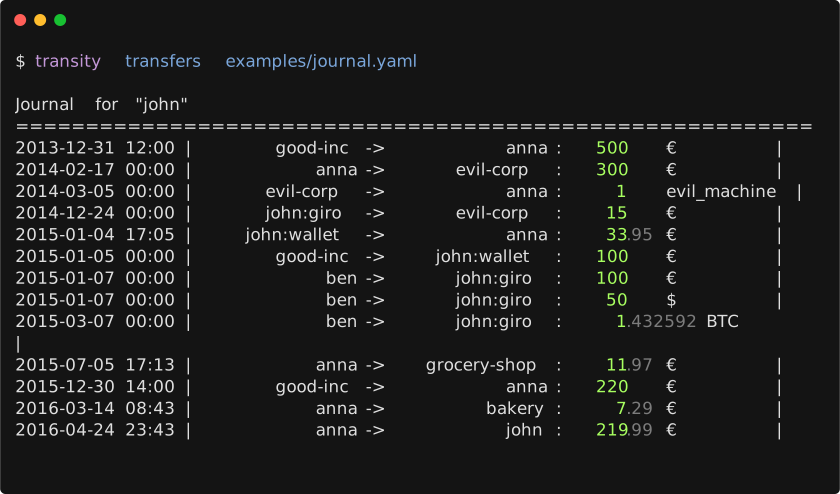
Transfers
Plotting
By default all accounts are plotted.
To limit it to only a subsection use awk to filter the output.
For example all transactions of Euro accounts:
transity gplot examples/journal.yaml \
| awk '/^$/ || /(EOD|^set terminal)/ || /€/' \
| gnuplot \
| imgcat
Or all account balances of Euro accounts over time:
transity gplot-cumul examples/journal.yaml \
| awk '/^$/ || /(EOD|^set terminal)/ || /€/' \
| gnuplot \
| imgcat
Scripts
Useful scripts leveraging other command line tools.
Check Order of Entries
Check if all entries are in a chronological order
ag --nonumbers "^ utc:" journals/main.yaml | tr -d "\'" | sort -c
Tutorials
- cs007.blog - Personal finance for engineers.
- principlesofaccounting.com - Online tutorial on accounting.